Nutrition Facts Label Generator: Complete 2026 Guide
A nutrition facts label generator is a tool that lets you input ingredient or nutrient data and produce a formatted nutrition facts panel that matches the style required by the U.S. Food and Drug Administration. Whether you’re labeling a homemade recipe, developing a food product, or building educational materials, understanding how these generators work and what data they require is the difference between a label that’s genuinely useful and one that’s misleading.
The FDA updated its nutrition facts label format in 2020, requiring manufacturers to list added sugars separately from total sugars, display calories in a larger font, and include four mandatory micronutrients: vitamin D, calcium, iron, and potassium. According to the FDA’s food labeling regulations under 21 CFR Part 101, these fields are not optional for commercial food products, and using an inaccurate or non-compliant label on a product sold to consumers can trigger enforcement action.
This guide covers everything that actually matters when creating a nutrition facts label: which tools are worth using in 2026, how to calculate your values accurately, what every field on the panel means and why it’s there, and the specific rules that differ depending on whether you’re a home baker, a cottage food producer, or a growing food business. You’ll walk away knowing not just how to generate the label, but how to make it accurate.
What Is a Nutrition Facts Label Generator?
A nutrition facts label generator is a digital tool that formats nutritional data into the standardized panel design recognized by the FDA and familiar to every food shopper in the United States.
These tools range from basic blank template fillers to database-connected recipe analyzers that pull ingredient data automatically. The simplest generators let you type in values manually and produce a printable label image. More sophisticated platforms connect to nutritional databases like USDA FoodData Central and calculate per-serving values from a full ingredient list.
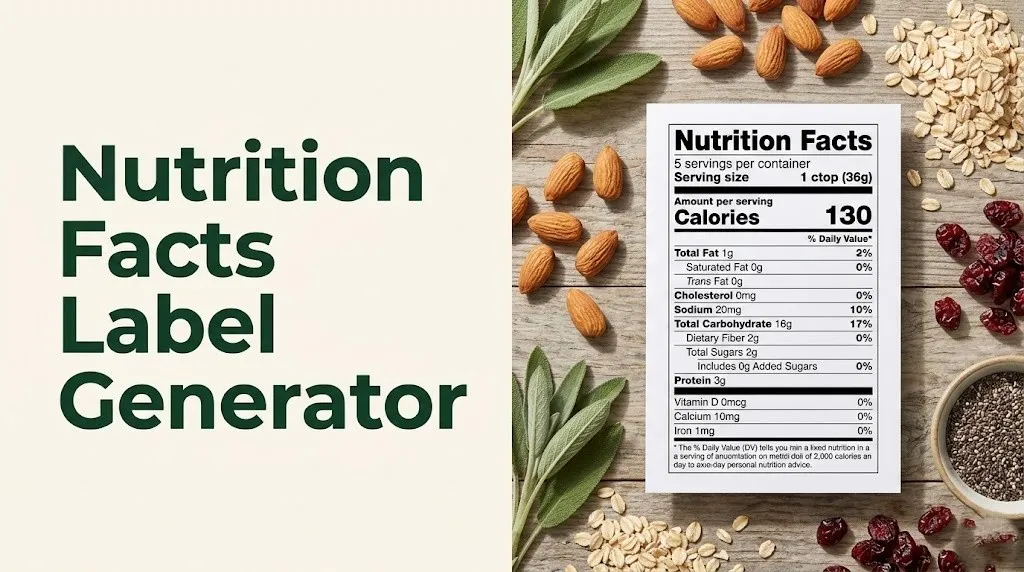
The label format these generators produce traces back to the Nutrition Labeling and Education Act (NLEA) of 1990, which first standardized the nutrition facts panel for packaged foods in the U.S. The FDA updated that format significantly in 2020. Any generator you use in 2026 should reflect the updated format, which includes the added sugars line, the updated daily value percentages, and the four mandatory micronutrients.
It’s worth understanding that a generator is only as accurate as the data you put into it. If you’re working from an estimated guess about how much sodium is in your recipe, the label it produces will be equally estimated. For commercial food products, estimated labels can create liability. For personal or educational use, a generator is a genuinely useful tool for understanding what’s in your food.
Key features to look for in a nutrition facts label generator:
- Connects to a verified nutritional database (USDA FoodData Central, ESHA Research, or Nutritionix)
- Supports the current FDA label format with added sugars line and updated %DV values
- Allows serving size customization using FDA Reference Amounts Customarily Consumed (RACCs)
- Exports as a print-ready PDF or scalable image file
- Clearly states whether the output is informational or FDA-compliant
Best Free Nutrition Facts Label Generator Options in 2026
Several free nutrition facts label generator tools are available in 2026, and they vary considerably in their accuracy, data sourcing, and output quality.
The most widely used free options include Nutritionix Recipe Calculator, Canva’s nutrition label template builder, and the USDA’s own FoodData Central, which doesn’t generate a formatted label but provides the verified data that every accurate label depends on. For small food businesses needing compliant labels, ESHA Research Genesis R&D and MenuStat are professional-grade options, though neither is free.
Here’s how the main free tools compare:
| Tool | Data Source | FDA Format (2020) | Recipe Analysis | Best Use Case |
|---|---|---|---|---|
| Nutritionix Recipe Calculator | Nutritionix database | Yes | Yes | Bloggers, home cooks |
| Canva Label Maker | Manual entry only | Template only | No | Visual design, education |
| MyFitnessPal Recipe Analyzer | Crowdsourced + USDA | Partial | Yes | Personal tracking |
| USDA FoodData Central | USDA verified data | No label output | No | Data lookup only |
| Open Food Facts | User-submitted | Varies | No | Reference only |
For anyone creating a label that will appear on a commercially sold product, none of the free tools listed above automatically produce an FDA-compliant label. The FDA does not certify label generators. Compliance depends on the accuracy of the underlying data and the judgment of the person entering values. A registered dietitian nutritionist (RDN) or a food scientist with labeling experience can review label data before commercial use.
People with specific dietary restrictions should note that free generators vary widely in how they handle data for specialty diets. Gluten-free, keto, or allergen-free products require careful manual verification because database entries don’t always distinguish between standard and allergen-free versions of the same ingredient.
How to Use a Nutrition Facts Template Effectively
A nutrition facts template is a pre-formatted document or image file that already contains the standard FDA label layout, with blank fields where you enter your specific nutritional data.
Using a nutrition facts template effectively means starting with the right data, not just the right format. The template itself is just a container. What goes inside it determines whether the label is accurate, trustworthy, and useful.
The FDA recognizes two primary label formats: the standard vertical format and a linear format for small packages with limited surface area. When choosing a template, match the format to the product’s packaging size and shape. A standard nutrition facts template works for most food packages with a vertical face panel of at least 40 square inches.
To use a template effectively:
- Identify the correct serving size for your food category using FDA’s Reference Amounts Customarily Consumed (RACC) table, which lists standard serving sizes by food type.
- Look up each ingredient’s nutritional data in USDA FoodData Central using the “SR Legacy” or “Foundation Foods” datasets, which contain verified, lab-tested values.
- Calculate total recipe nutrient amounts by multiplying each ingredient’s per-100g values by the gram weight used in the recipe.
- Divide total recipe values by the number of servings to get per-serving values.
- Enter per-serving values into the template fields in the exact order the FDA requires: calories, total fat, saturated fat, trans fat, cholesterol, sodium, total carbohydrates, dietary fiber, total sugars, added sugars, protein, and then the four mandatory micronutrients.
- Calculate percent daily values using the FDA’s 2020 Daily Reference Values for each nutrient.
- Review for mandatory fields: if any required field is missing, the template is incomplete regardless of how professional it looks.
People managing conditions like hypertension or type 2 diabetes should note that the template fields for sodium and total carbohydrates are particularly relevant to their dietary needs, and getting these values right matters beyond aesthetics.
How to Fill Out a Blank Nutrition Facts Template
A blank nutrition facts template is an empty version of the standard FDA panel that contains only the label structure and field labels, with no values filled in.
Filling one out accurately requires knowing both what to write in each field and where those numbers come from. Many people find a blank nutrition facts template online, open it in Word or a PDF editor, and type in whatever numbers seem close. That approach produces a label that looks official but may be inaccurate by a meaningful margin.
Each field on a blank nutrition facts template serves a regulatory and public health purpose:
| Label Field | Unit | Data Source | FDA Requirement |
|---|---|---|---|
| Serving Size | g or oz (household measure) | FDA RACC table | Mandatory |
| Servings Per Container | Number | Recipe yield divided by serving size | Mandatory |
| Calories | kcal | Calculated from macros using Atwater factors | Mandatory |
| Total Fat | g | Sum of all fat from all ingredients | Mandatory |
| Saturated Fat | g | Saturated fat fraction of total fat | Mandatory |
| Trans Fat | g | Industrial trans fat content | Mandatory (if present) |
| Cholesterol | mg | From animal-source ingredients | Mandatory |
| Sodium | mg | From all sodium-containing ingredients | Mandatory |
| Total Carbohydrate | g | Sum of all carbohydrates | Mandatory |
| Dietary Fiber | g | Soluble + insoluble fiber fraction | Mandatory |
| Total Sugars | g | All sugars naturally occurring + added | Mandatory |
| Added Sugars | g | Sugars added during processing | Mandatory (2020 update) |
| Protein | g | Total protein from all ingredients | Mandatory |
| Vitamin D | mcg | From ingredients, listed as mcg | Mandatory (2020 update) |
| Calcium | mg | From ingredients | Mandatory |
| Iron | mg | From ingredients | Mandatory |
| Potassium | mg | From ingredients | Mandatory |
The Atwater general factors are the standard method for calculating calories from macronutrients: protein provides 4 kcal per gram, carbohydrates provide 4 kcal per gram, and fat provides 9 kcal per gram. Alcohol, if present, provides 7 kcal per gram.
Older adults and individuals with kidney disease should note that the potassium field became mandatory on the 2020 FDA label format because most Americans consume too little potassium relative to sodium. However, people with chronic kidney disease are often advised by their nephrologist to limit potassium intake, making this field particularly relevant for their label-reading decisions.
Key Takeaway: Filling out a blank nutrition facts template accurately requires verified ingredient data from USDA FoodData Central, correct per-serving calculations, and knowledge of FDA’s mandatory field requirements, not just a template you found online.
How to Create an Editable Nutrition Facts Label
An editable nutrition facts label is a label file you can modify: changing values, adjusting serving sizes, updating ingredient information, and reformatting as your recipe or product changes.
The most practical formats for an editable nutrition facts label are Microsoft Word (.docx), Adobe InDesign, Canva (online), or fillable PDF. Each has trade-offs.
Word-based editable templates are the most accessible for home cooks and small food producers. They allow text editing, table formatting, and simple graphic adjustments. The limitation is that Word files don’t always maintain precise FDA label proportions when printed, which matters if the label will appear on a commercial product.
Canva offers an online editable nutrition label option that outputs a print-quality image file. It’s visually clean and accessible to non-designers. The significant limitation is that Canva doesn’t connect to a nutritional database: you enter values manually, and Canva formats them. The accuracy is entirely your responsibility.
For a genuinely editable label that also calculates values, tools like Nutritionix’s recipe analyzer or Cronometer produce both the data and a formatted label. These are the better options when your recipe involves many ingredients and manual calculation would introduce errors.
Quick Tip:
- Save your editable nutrition label file in two formats: a native editable format (Word or Canva) for future updates, and a flattened PDF or PNG for printing and sharing
- Keep a separate spreadsheet of your raw ingredient data and per-serving calculations so you can update the label accurately whenever your recipe changes
- If you’re using a Word-based template, lock the formatting so you only edit the value fields and don’t accidentally shift the label structure
How to Make a Nutrition Facts Label Step by Step
Making an accurate nutrition facts label requires working through a specific sequence: you need the right data before you can produce a label that actually reflects what’s in your food.
Here’s the complete process:
- Determine your serving size. Look up your food category in the FDA’s Reference Amounts Customarily Consumed (RACC) table. For example, the RACC for bread is 50g, for cookies is 30g, and for salad dressing is 30ml. Use this as your serving size unless your product differs substantially from the reference food.
- Weigh your full recipe yield. Use a kitchen scale to measure the total weight of the finished product in grams. Divide by your serving size in grams to get the number of servings per container.
- List every ingredient with its gram weight. Weigh each ingredient before combining, not after cooking, unless you’re using cooked-food values from the database.
- Look up each ingredient in USDA FoodData Central. Use the “Foundation Foods” or “SR Legacy” dataset. Find the nutritional values per 100g. Multiply by your ingredient weight in grams, then divide by 100 to get the nutrient contribution from that ingredient.
- Sum all ingredients for each nutrient. Add up the total grams of protein, fat, carbohydrates, fiber, sodium, and each micronutrient across all ingredients.
- Divide totals by number of servings. This gives you per-serving values for each nutrient field.
- Calculate calories. Multiply protein grams by 4, carbohydrate grams by 4, and fat grams by 9. Sum these three numbers for total calories per serving.
- Calculate percent daily values. The FDA provides specific Daily Reference Values for each nutrient. Divide your per-serving value by the reference value and multiply by 100 to get the %DV.
- Enter values into your chosen generator or template. Use the FDA’s 2020 label format. Confirm all mandatory fields are present.
- Review for rounding rules. The FDA specifies rounding rules for each nutrient: for example, calories must be rounded to the nearest 5 for values under 50 and to the nearest 10 for values 50 and above.
According to the FDA’s guidance on nutrition labeling, nutrient values derived from databases are acceptable for informational labels, but commercial products sold to the public may require laboratory analysis for strict compliance, particularly for products where nutrient content may vary significantly with batch or season.
What Information Goes on a Nutrition Facts Label?
A standard nutrition facts label contains 17 mandatory data fields organized in a specific order that the FDA has established through federal regulation.
Every field serves a distinct purpose. The label isn’t a marketing document: it’s a standardized disclosure tool designed to give consumers consistent, comparable nutritional information across all packaged foods sold in the United States.
The Dietary Guidelines for Americans 2020-2025 use the nutrition facts panel as a key tool for helping Americans understand their food environment. The guidelines specifically reference percent daily values as a practical shortcut for evaluating whether a serving of food is high or low in a specific nutrient.
Here is every field that belongs on a standard nutrition facts panel:
| Section | Field | Unit | Notes |
|---|---|---|---|
| Header | Serving Size | g + household measure | Based on FDA RACC |
| Header | Servings Per Container | Number | Rounded per FDA rules |
| Calories | Calories | kcal | Large bold font (2020 format) |
| Fats | Total Fat | g | All fat types combined |
| Fats | Saturated Fat | g | Indented under Total Fat |
| Fats | Trans Fat | g | Indented; mandatory if present |
| Other | Cholesterol | mg | From animal-source ingredients |
| Other | Sodium | mg | All sodium sources |
| Carbs | Total Carbohydrate | g | All carb types combined |
| Carbs | Dietary Fiber | g | Indented |
| Carbs | Total Sugars | g | Indented |
| Carbs | Added Sugars | g | Indented under Total Sugars |
| Protein | Protein | g | Not required to have %DV for most foods |
| Micros | Vitamin D | mcg | Mandatory since 2020 |
| Micros | Calcium | mg | Mandatory |
| Micros | Iron | mg | Mandatory |
| Micros | Potassium | mg | Mandatory since 2020 |
| Footer | %DV footnote | Text | Standard FDA footnote text required |
Voluntary nutrients that manufacturers may choose to add include vitamin A, vitamin C, vitamin E, vitamin K, thiamin, riboflavin, niacin, vitamin B6, folate, vitamin B12, biotin, pantothenic acid, phosphorus, iodine, magnesium, zinc, selenium, copper, manganese, chromium, and molybdenum.
Individuals following a low-sodium diet for cardiovascular health should pay particular attention to the sodium field and its %DV. The FDA considers 5% DV or less to be low in sodium and 20% DV or more to be high.
FDA Nutrition Facts Label Requirements Explained
The FDA’s nutrition facts label requirements are established under 21 CFR Part 101, the federal regulation that governs food labeling for all products sold in interstate commerce in the United States.
Understanding these requirements matters whether you’re using a generator for educational purposes or preparing to sell a food product commercially. The gap between what a generator produces and what the FDA actually requires is where many small food producers run into problems.
FDA nutrition facts label requirements include the following mandatory elements:
- The exact title “Nutrition Facts” in a specific font and size
- Serving size stated in both household measures and grams (or milliliters for liquids)
- Calories displayed in a font size at least twice as large as other nutrient values
- All 17 mandatory nutrient fields listed in the exact order the FDA specifies
- Percent daily values calculated using FDA’s 2020 Daily Reference Values
- A footnote stating: “The % Daily Value (DV) tells you how much a nutrient in a serving of food contributes to a daily diet. 2,000 calories a day is used for general nutrition advice.”
- All mandatory allergen declarations in plain language
The FDA exempts certain products from standard nutrition labeling requirements. Foods sold by small businesses (defined as businesses with food sales below $50,000 per year or total sales below $500,000 per year) may qualify for small business exemptions. Raw fruits, vegetables, and fish are subject to voluntary guidelines. Restaurant and food service items are not required to carry a nutrition facts panel, though chain restaurants with 20 or more locations must post calorie counts on menus.
Pregnant individuals and people managing gestational diabetes should note that the mandatory micronutrient disclosures, particularly folate (when voluntarily listed), iron, and calcium, are especially relevant for prenatal nutrition planning. A registered dietitian nutritionist (RDN) can help interpret these label values in the context of prenatal dietary needs.
Key Takeaway: The FDA’s nutrition facts label requirements under 21 CFR Part 101 mandate specific fields, formats, and footnote language. A generator that produces a visually correct label does not automatically mean that label meets federal compliance standards for commercial food products.
How Serving Size on a Nutrition Facts Label Is Determined
The serving size on a nutrition facts label is not a suggestion about how much you should eat. It’s a standardized reference amount that the FDA defines separately from any dietary recommendation.
The FDA establishes serving size on a nutrition facts label through its Reference Amounts Customarily Consumed (RACC) system, which sets standard serving sizes for over 150 food categories based on surveys of how much of each food Americans typically eat in a single eating occasion.
Think of the RACC like a standard measuring unit. Just as a cup is always 8 fluid ounces regardless of how much coffee you pour yourself, the RACC for a food category is fixed regardless of how much of that food any individual actually eats. It exists to make labels comparable across products in the same category.
Examples of FDA Reference Amounts Customarily Consumed:
| Food Category | RACC (Standard Serving Size) |
|---|---|
| Bread | 50g |
| Cookies | 30g |
| Ice cream | 2/3 cup (approximately 85g) |
| Salad dressing | 30ml (2 tablespoons) |
| Breakfast cereal | 30g (varies by density) |
| Fruit juice | 240ml (1 cup) |
| Snack chips | 30g |
| Pasta (dry) | 55g |
| Pasta (cooked) | 140g |
| Peanut butter | 2 tablespoons (32g) |
For products where a single unit weighs between 200% and 300% of the RACC, the FDA requires the label to list both per-serving and per-container nutrition information as a dual-column label. This rule was introduced in the 2020 label update to address situations like a bottle of soda or a bag of chips that most people consume in one sitting but which contains two or three labeled servings.
People monitoring their caloric intake for weight management should understand that when a product shows “servings per container: 2.5,” multiplying the per-serving calorie count by 2.5 gives the total calories in the entire package, which is often larger than the single serving number suggests.
What Daily Value Percentage on a Nutrition Label Actually Means
The percent daily value (%DV) on a nutrition facts label tells you how much of a nutrient’s recommended daily reference amount one serving of the food provides, based on a 2,000-calorie reference diet.
The daily value percentage on a nutrition label is a practical shortcut, not a precise personal target. The 2,000-calorie reference diet used to calculate %DV is a regulatory baseline, not a dietary recommendation for every individual. According to the FDA, the %DV is designed to help consumers compare foods and understand the relative nutritional contribution of a serving, not to predict exactly how a food fits into any one person’s specific caloric needs.
The current %DV reference values, updated with the 2020 label format, are based on recommendations from the Dietary Guidelines for Americans 2020-2025 and the Institute of Medicine’s Dietary Reference Intakes. The reference values changed from earlier standards: for example, the daily value for sodium dropped from 2,400mg to 2,300mg, and a specific daily value for added sugars (50g) was established for the first time.
A quick-reference guide for interpreting %DV:
| %DV per Serving | What It Means |
|---|---|
| 5% or less | Low in this nutrient |
| 10% to 19% | Moderate source |
| 20% or more | High in this nutrient |
Whether high or low is desirable depends on the nutrient. For sodium, saturated fat, and added sugars, lower %DV per serving is generally preferable for most adults. For dietary fiber, vitamin D, calcium, iron, and potassium, higher %DV per serving reflects a more nutritious contribution to the day’s intake.
Children under 4 years old, infants, and pregnant individuals have different daily nutrient needs than the 2,000-calorie adult reference. The %DV does not apply directly to these groups, and a registered dietitian nutritionist or pediatrician can help interpret label values in the context of those specific needs.
Added Sugars vs. Total Sugars on a Nutrition Label
Total sugars represent all sugars present in a food, both those that occur naturally in the ingredients and those added during manufacturing or preparation. Added sugars are only those sugars introduced to the food during processing, distinct from naturally occurring sugars.
The added sugars vs. total sugars on a label distinction was the most consequential update to the FDA nutrition facts label format in 2020. Before this change, consumers had no way to distinguish a teaspoon of honey added to a food from the natural sugars in the fruit the food contained.
The difference matters because research has linked high added sugar intake to increased risk of cardiovascular disease, type 2 diabetes, and dental caries, while naturally occurring sugars in whole fruits and dairy come packaged with fiber, vitamins, and minerals that moderate their metabolic effects. A 2019 study published in the British Medical Journal found an association between higher consumption of added sugars and increased risk of cardiovascular mortality, distinct from total sugar intake.
Here are examples of how total sugars and added sugars differ on real food labels:
| Food | Total Sugars (g) | Added Sugars (g) | Natural Sugars (g) |
|---|---|---|---|
| Plain whole milk yogurt (1 cup) | 12 | 0 | 12 (lactose) |
| Strawberry flavored yogurt (1 cup) | 26 | 14 | 12 |
| 100% orange juice (1 cup) | 21 | 0 | 21 |
| Orange-flavored drink (1 cup) | 24 | 20 | 4 |
| Raisins (1/4 cup) | 25 | 0 | 25 |
| Granola bar | 12 | 8 | 4 |
According to the Dietary Guidelines for Americans 2020-2025, added sugars should account for less than 10% of total daily calorie intake. On a 2,000-calorie diet, that translates to no more than 50 grams, or about 12 teaspoons, of added sugars per day.
People managing type 2 diabetes or insulin resistance should work with an endocrinologist or registered dietitian nutritionist to determine an individualized added sugar target. The FDA’s 50g reference is not a clinical target for people with metabolic conditions.
Key Takeaway: The added sugars line on the 2020 FDA label format is the most clinically meaningful change to nutrition labeling in decades. When choosing between two similar products, a higher added sugar %DV signals a product where sweetness comes primarily from manufacturing, not from whole-food ingredients.
How to Calculate Nutrition Facts for a Recipe
Calculating nutrition facts for a recipe requires converting your full recipe ingredient list into per-serving nutrient values using verified food composition data.
To calculate nutrition facts for a recipe accurately:
- List every ingredient with its exact weight in grams. Measure ingredients by weight, not volume, for accuracy. A cup of almond flour and a cup of bread flour have very different gram weights and nutritional profiles.
- Look up each ingredient in USDA FoodData Central. Search by ingredient name. Prioritize “Foundation Foods” or “SR Legacy” entries, which contain laboratory-verified data rather than manufacturer-submitted values.
- Record the per-100g values for each nutrient you need. You’ll need at minimum: calories, total fat, saturated fat, trans fat, cholesterol, sodium, total carbohydrates, dietary fiber, total sugars, protein, vitamin D, calcium, iron, and potassium.
- Calculate each ingredient’s nutrient contribution. Multiply the per-100g value by your ingredient’s gram weight, then divide by 100. For example: if your recipe uses 200g of all-purpose flour, and flour has 2.0g of protein per 100g, that ingredient contributes 4.0g of protein to the full recipe.
- Account for cooking loss. Cooking can reduce water-soluble vitamins and increase or decrease concentration of other nutrients depending on the method. USDA FoodData Central provides cooked values for many common foods. Use cooked values if your recipe is eaten in its cooked form.
- Sum all ingredient contributions for each nutrient. This gives you total recipe nutrient values.
- Calculate your yield. Weigh the finished recipe in grams. Divide by your serving size in grams (using FDA’s RACC for your food category) to get the number of servings.
- Divide total recipe values by number of servings. This produces your per-serving values, which go directly into the label.
- Apply FDA rounding rules. For calories: round to the nearest 5 if under 50 calories, nearest 10 if 50 or above. For total fat: round to the nearest 0.5g if under 5g, nearest 1g if 5g or above. Each nutrient has specific rounding rules in FDA guidance.
- Verify your calculated calories match macro math. Protein grams x 4 plus carbohydrate grams x 4 plus fat grams x 9 should equal or closely approximate your calculated calorie value. If there’s a large discrepancy, recheck your data entry.
The Academy of Nutrition and Dietetics recommends that food businesses requiring precise label data consider professional recipe analysis software like ESHA Research Genesis R&D, which uses a comprehensive database and applies FDA rounding rules automatically.
Nutrition Facts Label Requirements for Small Businesses
Small food businesses in the United States face a different set of FDA nutrition facts labeling requirements than large manufacturers, with specific exemptions that depend on annual food sales and business size.
Nutrition facts label requirements for small businesses are established under FDA’s small business exemption, which allows businesses that sell fewer than 10,000 units of a product per year or have total food sales under $50,000 per year to request exemption from the standard nutrition labeling requirement. Businesses with total annual sales under $500,000 (across all goods, not just food) may also qualify.
However, these exemptions apply only to mandatory labeling. If a small business voluntarily places any nutrition claim on the label (such as “low fat,” “high fiber,” or “good source of vitamin D”), the product automatically becomes subject to full FDA nutrition labeling requirements, regardless of business size.
Key considerations for small food businesses:
- Cottage food laws vary by state. Some states allow the sale of homemade foods with a simplified ingredient label only, with no nutrition facts panel required. Other states require full FDA-format labels once sales exceed a defined threshold.
- Products sold directly to consumers at farmers markets, pop-up events, or through CSA boxes may fall under different state regulations than products sold in retail stores.
- Products sold online and shipped across state lines enter interstate commerce and fall under federal FDA jurisdiction, regardless of business size or state cottage food laws.
- Any product making a health claim, structure-function claim, or comparative nutritional claim (such as “30% less sodium than our original recipe”) must comply with FDA labeling regulations for that specific claim type.
A food regulatory consultant or an RDN specializing in food product development can review your specific product and sales channel to determine which labeling requirements apply. For businesses considering scaling into retail, investing in compliant label development early avoids costly reformulation or label redesign later.
How to Create a Nutrition Label for Homemade Food
Creating a nutrition label for homemade food depends entirely on what you plan to do with that food: keep it for personal use, give it as a gift, sell it locally under a cottage food law, or scale into commercial retail.
For personal use or gift-giving, an informational label created through any nutrition facts label generator is entirely appropriate. There’s no legal requirement for accuracy or FDA format compliance when you’re not selling the food. The value here is personal: knowing roughly what’s in your homemade granola or protein balls helps you track your own intake.
For local sale under a cottage food law, requirements differ significantly by state. Most state cottage food laws require at minimum a product name, a list of ingredients in descending order by weight, the producer’s name and address, allergen declarations, and the statement that the product was made in a home kitchen not inspected by the state health department. Very few state cottage food laws require a full FDA-format nutrition facts panel.
For retail sale in any store, or online sale shipped across state lines, full FDA nutrition facts panel compliance is required. This means:
- Nutritional values verified through USDA database analysis or laboratory testing
- All 17 mandatory label fields present and correctly formatted
- Serving size based on FDA’s RACC for the product category
- %DV calculated using current FDA Daily Reference Values
- Allergen declarations in plain language for all 9 major allergens (milk, eggs, fish, shellfish, tree nuts, peanuts, wheat, soybeans, sesame) per the Food Allergen Labeling and Consumer Protection Act (FALCPA) and the FASTER Act of 2021, which added sesame as the ninth major allergen effective January 1, 2023
Individuals with celiac disease or severe food allergies should note that homemade food labels, even when voluntarily created, cannot be assumed to meet FDA allergen disclosure standards unless the producer explicitly followed those standards. Cross-contact from shared kitchen equipment is a real concern in home kitchens that commercial food facility regulations address more rigorously.
Key Takeaway: A nutrition label for homemade food only needs to meet FDA compliance standards if you’re selling the product commercially. For home use or local cottage food sales, a generator-produced informational label is practical and legally appropriate, but know which state rules apply before you sell.
How to Read a Nutrition Facts Label Accurately
Reading a nutrition facts label accurately means understanding what each field represents, how the percent daily values apply to your personal situation, and which numbers matter most depending on your specific health goals.
The process of how to read a nutrition facts label starts at the top and works down, with each section building on the last:
Start with serving size and servings per container. All values on the label apply to one serving, not the whole package. If a bag of chips shows 150 calories per serving but contains 3.5 servings, the whole bag contains 525 calories. This is the single most commonly misread part of any label.
Check calories next. The calorie count tells you the total energy in one serving. This alone doesn’t tell you whether a food is nutritious: a tablespoon of olive oil and a tablespoon of corn syrup have similar calorie counts but very different nutritional profiles.
Review the nutrients to limit. The FDA recommends most Americans limit their intake of saturated fat, sodium, and added sugars. For these nutrients, a lower %DV per serving is generally preferable for adults without specific medical conditions.
Review the nutrients to get enough of. Dietary fiber, vitamin D, calcium, iron, and potassium are the nutrients Americans most commonly consume below recommended levels, according to the Dietary Guidelines for Americans 2020-2025. For these nutrients, a higher %DV per serving reflects a more nutritious contribution.
Use the %DV as a comparison tool. When choosing between two similar products, comparing the %DV for the nutrients you care about is faster and more practical than trying to calculate exact gram amounts.
Check the ingredient list. The nutrition facts panel shows amounts, but the ingredient list shows sources. Ingredients are listed in descending order by weight, so the first three ingredients make up most of the product. If added sugar appears in three different forms (cane sugar, brown rice syrup, honey) across the top five ingredients, the actual sugar contribution is higher than any single ingredient entry suggests.
People with kidney disease should pay particular attention to the potassium and phosphorus content (phosphorus, when voluntarily listed). Their nephrologist can provide specific target amounts based on their current kidney function and lab values, as both nutrients accumulate when kidney filtration is impaired.
Are Fake Nutrition Facts Labels Legal or Ethical?
A fake nutrition facts label is any label that presents fabricated or intentionally inaccurate nutritional data as factual information about a food product.
The term “fake nutrition facts” covers a wide range of situations with very different legal and ethical implications. Some are clearly harmless: a teacher creates a fictional cereal box for a food literacy lesson. Some are clearly problematic: a food producer lists lower calorie or sodium values than the product actually contains to make it appear healthier.
Under FDA regulations and the Federal Food, Drug, and Cosmetic Act (FD&C Act), placing a nutrition facts panel on a food product with intentionally false or misleading nutritional information is a federal violation. It constitutes misbranding and can result in product seizure, injunctions, and criminal prosecution. The FDA actively monitors nutrition label accuracy through market surveillance and periodic testing.
In educational and satirical contexts, fake nutrition labels are legal when they’re clearly not intended to deceive a consumer about an actual food product. A parody label on a clearly fictional product, a classroom exercise, or a social media post where the fictional nature is obvious does not constitute misbranding under FD&C Act standards, because there’s no consumer deception about an actual product being sold.
The ethical line is intent and context:
- Educational use (classroom, nutrition literacy projects): Generally acceptable and legal
- Satirical or artistic use (clearly labeled as parody): Generally acceptable and legal
- Social media pranks designed to spread false nutritional information: Ethically problematic, potentially misleading to viewers who screenshot and share without context
- Commercial products with inaccurate labels: Illegal under FDA regulations, regardless of whether the inaccuracy was intentional or resulted from careless calculation
If you’re building educational materials that include a fake nutrition facts label, clearly mark the label as “For Educational Purposes Only” or “Sample Label” to prevent any possible consumer confusion. Generators designed for educational use often include a watermark or disclaimer for exactly this reason.
Frequently Asked Questions About Nutrition Facts Labels
Can I create a nutrition facts label for free online?
Yes, several free tools let you create a nutrition facts label online, including Nutritionix Recipe Calculator, Canva’s label template builder, and Cronometer.
These tools vary in whether they connect to a verified nutritional database or require you to enter values manually, which affects how accurate the output is.
For personal or educational use, free tools are entirely sufficient. For commercially sold products, the data accuracy and FDA format compliance of any free tool should be verified independently.
Is a nutrition facts label I generate online FDA compliant?
A label generated by an online tool is not automatically FDA compliant. FDA compliance depends on the accuracy of the nutritional data, whether all 17 mandatory fields are present and correctly formatted, and whether the serving size follows FDA’s Reference Amounts Customarily Consumed for your food category.
No online generator is officially certified by the FDA. The FDA does not endorse or certify any labeling software.
For commercial products, a food regulatory consultant or registered dietitian nutritionist with labeling experience should review the label before it appears on any product sold to consumers.
How do I calculate the calories for a nutrition facts label?
Calories are calculated by multiplying protein grams by 4, carbohydrate grams by 4, and fat grams by 9, then adding those three numbers together.
This calculation is based on the Atwater general factors, the standard method used in FDA-regulated nutrition labeling.
Start by calculating total macronutrient grams for your full recipe using USDA FoodData Central data, then divide by the number of servings before applying the Atwater formula.
What nutrients are required on a nutrition facts label?
The FDA requires 17 fields on a standard nutrition facts panel: serving size, servings per container, calories, total fat, saturated fat, trans fat, cholesterol, sodium, total carbohydrates, dietary fiber, total sugars, added sugars, protein, vitamin D, calcium, iron, and potassium.
Vitamin D and potassium became mandatory on the updated 2020 FDA label format, replacing the previously mandatory vitamins A and C, which are now voluntary.
Manufacturers may voluntarily add other vitamins and minerals, but they cannot omit any of the 17 mandatory fields on a standard nutrition facts panel.
Do homemade foods need a nutrition facts label?
Homemade foods do not require a nutrition facts label for personal use or as gifts. State cottage food laws determine whether a nutrition label is required for locally sold homemade foods, and most state cottage food laws require only a basic ingredient list and allergen declaration, not a full FDA-format nutrition panel.
Once a homemade food is sold online and shipped across state lines, it enters interstate commerce and falls under full FDA jurisdiction, which requires a compliant nutrition facts panel.
A food regulatory attorney or a state department of agriculture can clarify the specific requirements that apply to your product based on your sales channel and state.
What is the difference between a nutrition facts panel and a supplement facts panel?
A nutrition facts panel appears on conventional food products and is regulated by the FDA under the Nutrition Labeling and Education Act (NLEA) and 21 CFR Part 101.
A supplement facts panel appears on dietary supplements including vitamins, minerals, herbs, and protein powders, and is regulated by the FDA under the Dietary Supplement Health and Education Act (DSHEA) of 1994, which has different field requirements, serving size conventions, and claim restrictions.
The two panels look similar but serve different regulatory purposes, and using the wrong panel type on a product (for example, putting a nutrition facts panel on a product that the FDA classifies as a dietary supplement) can result in misbranding.
The Practical Bottom Line
A nutrition facts label generator is a genuinely useful tool when you pair it with accurate data and a clear understanding of what you’re producing the label for. The tool creates the format. You supply the accuracy.
For personal recipe tracking and homemade food labeling, any reputable free generator combined with USDA FoodData Central data gives you a label that’s meaningful, informative, and honest. For commercial food products, the stakes are higher and the process requires more rigor: verified ingredient data, FDA RACC-based serving sizes, correct %DV calculations, and compliance with allergen labeling requirements.
The most useful thing you can take from this guide is this: start with the data, not the label. Know what’s in your food before you put a number on it.